notepush-ios-main
NotePush Support
Welcome to NotePush Support! We’re here to help you get the most out of your enhanced push notification experience.
Quick Links
- 📧 Email Support: support@notepush.app
- 🔧 Technical Issues: developer@notepush.app
- 📖 Full Documentation: docs.notepush.app
- 🔒 Privacy Policy: docs.notepush.app/privacy
- 📱 App Store: Download NotePush
Getting Started
What is NotePush?
NotePush is an enhanced version of the open-source ntfy iOS client with additional features to make notification management easier and more powerful. Like the original ntfy app, you can connect to any compatible notification server, but NotePush adds:
- 📱 QR Code Server Setup - Scan QR codes for instant server configuration
- 🔗 Multi-Topic Subscriptions - Subscribe to multiple topics simultaneously
- 🖼️ Enhanced Attachment Previews - Better image and file preview capabilities
- ⚙️ Improved Server Management - Easier configuration and credential management
How to Get Started:
- Choose a Server
- 🏠 Self-hosted: Run your own ntfy server (most private)
- 🌐 Public: Use ntfy.sh or other public servers
- 🏢 Enterprise: Connect to your organization’s server
- Add Your Server
- Open NotePush → Tap “+” → Enter server URL manually
- NEW: Scan a QR code for instant setup
- NEW: Configure multiple topics at once
- Subscribe to Topics
- Create meaningful topic names (e.g., “home-alerts”, “work-notifications”)
- NEW: Subscribe to multiple topics simultaneously
- Keep topic names private and non-guessable
- Start Receiving Notifications
- Send HTTP requests to your server
- Notifications appear instantly on your device
- NEW: Enhanced attachment previews
Need detailed setup instructions? → Full Documentation
Test QR Code for App Store Reviewers
Quick Testing for Reviewers: We’ve provided a test QR code to easily demonstrate the enhanced QR code functionality:
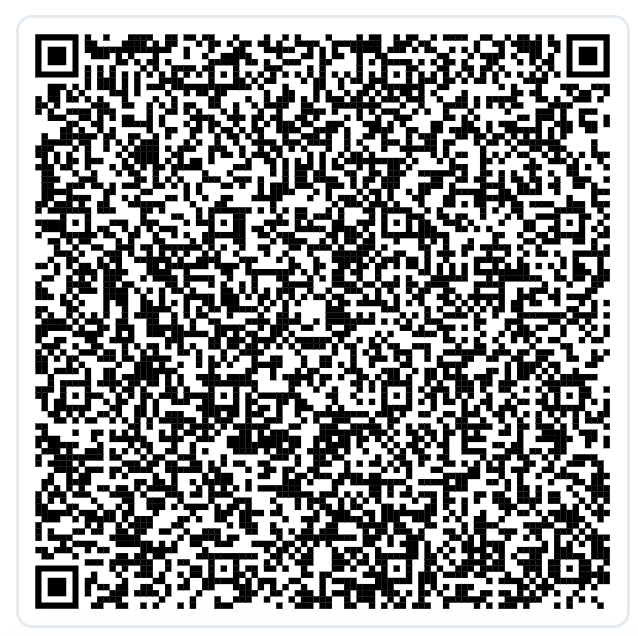
What it does: This QR code automatically configures NotePush to connect to the public ntfy.sh server and subscribe to two test topics.
How to Test:
- Open NotePush → Tap “+” → “Scan QR Code”
- Point camera at the QR code above
- Review the configuration (shows ntfy.sh server with two test topics)
- Confirm to subscribe to the test topics
- Send test notifications by visiting https://ntfy.sh/[topic-name] in a browser
- Send a message to see instant notification delivery
What This Demonstrates:
- ✅ QR code scanning and camera integration
- ✅ Multi-topic subscription setup (two topics in one scan)
- ✅ Automatic server configuration
- ✅ Real-time notification delivery
- ✅ Enhanced attachment preview (if you send image URLs)
Enhanced Features Guide
🆕 QR Code Server Setup
Quick Setup via QR Code:
- Get a QR code from your server administrator
- Open NotePush → Tap “+” → “Scan QR Code”
- Point camera at QR code
- Confirm server and topic subscriptions
- Done! All topics configured automatically
QR Code Benefits:
- Instant multi-topic configuration
- Automatic authentication setup
- No manual typing of server URLs
- Bulk topic subscription
🆕 Multi-Topic Subscriptions
Subscribe to Multiple Topics:
- Single QR scan can configure multiple topics
- Different authentication per topic (if needed)
- Organized topic management
- Bulk operations support
🆕 Display Name Support
Improved Usability for Security Best Practices:
Public ntfy servers recommend using hard-to-guess topic names to reduce the risk of unwanted access. NotePush’s display name feature makes this more practical:
The Challenge:
- Simple topics can be discovered: Topics like “alerts” or “home” might be found and used by others
- Complex topics are hard to manage: UUIDs like “a7b2c3d4-e5f6-7890-abcd-ef1234567890” are difficult to work with
NotePush Makes It Easier:
- Use secure topics, see friendly names: Keep UUID topics for privacy, show meaningful names to users
- QR code sharing: Distribute configurations with readable names like “🏠 Home Alerts” while using secure topic IDs
- No manual typing: Users work with friendly names, never need to handle complex topic strings
- Better organization: Especially helpful when managing multiple topics
Example:
Actual topic: "a7b2c3d4-e5f6-7890-abcd-ef1234567890" (hard to guess)
Display name: "🚨 Critical Alerts" (easy to understand)
Result: Better security practices with good usability
Benefits:
- ✅ Easier Security: Makes it practical to follow hard-to-guess topic recommendations
- ✅ Better Organization: Human-readable names for subscription management
- ✅ Simplified Sharing: QR codes can include meaningful names
- ✅ Public Server Friendly: Reduces friction when using recommended practices
🆕 Enhanced Attachment Previews
Improved Attachment Support:
- Images: Full preview with zoom capability
- GIFs: Animated playback support
- Files: Better file type detection
- Direct Download: Tap to open in external apps
Common Issues & Solutions
🔔 Notifications Not Appearing
Check Permissions:
- iOS Settings → Notifications → NotePush → Enable “Allow Notifications”
- iOS Settings → General → Background App Refresh → Enable for NotePush
Test Your Setup:
- Open NotePush → Settings → Run Diagnostics
- Try the Test Local Notification button
- Verify your server URL is correct and accessible
Still not working? Email us at support@notepush.app with:
- Your server URL (if you’re comfortable sharing)
- Screenshot of diagnostic results
- iOS version and device model
🌐 Server Connection Problems
Common Fixes:
- HTTPS Required: External servers must use HTTPS (not HTTP)
- Check URL Format:
https://your-server.comorhttps://ntfy.sh - Verify Server Status: Can you access your server in a web browser?
- Authentication: Double-check username/password if required
Testing with Public Server:
Try connecting to https://ntfy.sh first to verify the app works, then troubleshoot your custom server.
📱 QR Code Scanning Issues
Camera Permission Required:
- iOS Settings → Privacy & Security → Camera → NotePush → Enable
- Good Lighting: Ensure QR code is well-lit and clear
- Manual Entry: If scanning fails, enter server details manually
QR Code Format:
- Must be HTTPS URL or valid JSON configuration
- Check with your server administrator for correct format
🔋 Background Notifications Delayed
Understanding iOS Limitations:
- iOS controls when apps can run in background
- Frequency depends on how often you use the app
- Battery level affects background activity
Optimization Tips:
- Use the app regularly (increases iOS priority)
- Keep in recent apps (don’t force-close)
- Charge your device (iOS limits background activity on low battery)
- Enable all permissions (notifications + background refresh)
Server Setup Help
🏠 Self-Hosting (Recommended for Privacy)
Quick Docker Setup:
# Basic setup
docker run -p 80:80 -v /var/cache/ntfy:/var/cache/ntfy binwiederhier/ntfy

# With HTTPS (production)
docker run -p 443:80 -v /var/cache/ntfy:/var/cache/ntfy binwiederhier/ntfy
Need detailed server setup? → ntfy Documentation
🌐 Public Servers
Recommended Public Servers:
- ntfy.sh - Official public server (reliable, but less private)
- Check community forums for other trusted servers
Public Server Considerations:
- ✅ Easy to set up
- ✅ No maintenance required
- ❌ Less private than self-hosting
- ❌ Dependent on third-party service
🏢 Enterprise Setup
For Organizations:
- Deploy ntfy server on your infrastructure
- Configure authentication and access controls
- Set up HTTPS with your domain
- NEW: Generate QR codes for easy user setup
Need enterprise support? Contact developer@notepush.app
Sending Notifications
Basic Examples
Simple Message:
curl -d "Hello World!" https://your-server.com/your-topic
With Title and Priority:
curl -H "Title: Alert" -H "Priority: urgent" -d "Server is down!" https://your-server.com/alerts
With Attachments (Enhanced Preview):
# Image attachment
curl -H "Title: Server Status" -H "Attach: https://example.com/chart.png" -d "Daily metrics" https://your-server.com/monitoring

# File attachment
curl -H "Title: Report" -H "Attach: https://example.com/report.pdf" -d "Monthly report ready" https://your-server.com/reports
From Programming Languages:
// JavaScript/Node.js
fetch('https://your-server.com/your-topic', {
  method: 'POST',
  body: 'Hello from JavaScript!'
});
# Python
import requests
requests.post('https://your-server.com/your-topic', data='Hello from Python!')
More examples: → Full Documentation
Privacy & Security
🔒 Your Privacy is Protected
What We DON’T Collect:
- ❌ Personal information (name, email, phone)
- ❌ Notification content or messages
- ❌ Location data
- ❌ Usage analytics for advertising
What We DO Collect:
- ✅ Device identifier (for push delivery only)
- ✅ Crash logs (anonymized, for bug fixes)
Local Storage Only:
- All your data stays on your device
- Server credentials encrypted in iOS Keychain
- No cloud synchronization or backup
🛡️ Security Best Practices
App Security:
- Keep NotePush updated
- Use strong device passcode/Face ID
- Review server connections periodically
Server Security:
- Use HTTPS for external servers
- Enable authentication on your server
- Use strong, unique passwords
- Keep server software updated
Frequently Asked Questions
General Questions
Q: How is NotePush different from the original ntfy iOS app? A: NotePush builds on the excellent open-source ntfy foundation with enhanced features: QR code server setup, multi-topic subscriptions, display name support for better topic management, improved attachment previews, and better server management - all while maintaining the same privacy-first approach.
Q: Why is display name support useful? A: It makes security best practices more practical. Public ntfy servers recommend using hard-to-guess topic names (like UUIDs) to reduce unwanted access, but these are difficult for users to manage. NotePush lets you use secure topic names while showing friendly names like “Home Alerts” to users, making it easier to follow recommended practices without sacrificing usability.
Q: Do I need to pay for a server? A: Not necessarily! You can use free public servers like ntfy.sh, run your own at home, or use cloud hosting starting from a few dollars per month.
Q: Can I use multiple servers? A: Yes! NotePush supports multiple servers simultaneously. Perfect for separating work and personal notifications.
Technical Questions
Q: What servers are compatible? A: Any server implementing the ntfy protocol, including the official ntfy server software and compatible implementations.
Q: How reliable are notifications? A: Very reliable when properly configured. iOS controls background timing, but NotePush includes optimizations for best delivery.
Q: Can I send notifications programmatically? A: Absolutely! Use simple HTTP requests from any programming language, script, or automation tool.
Privacy Questions
Q: Can NotePush see my notifications? A: No! Notifications go directly from your server to your device. We never see your notification content.
Q: Is my data shared with anyone? A: No. All data stays on your device. We only use Firebase for the delivery mechanism (not content).
Q: Can I use this for business? A: Yes! The enhanced features make it even better for enterprise use where you want to control your notification infrastructure.
Contact Support
📧 Email Support
General Support:
- Email: support@notepush.app
- Response Time: Within 24-48 hours
- Best For: App usage questions, setup help, account issues
Technical Issues:
- Email: developer@notepush.app
- Response Time: Within 24-48 hours
- Best For: Bug reports, server configuration, technical problems
📋 When Contacting Support
Please Include:
- Device: iPhone/iPad model and iOS version
- App Version: Found in NotePush Settings → About
- Issue Description: What you were trying to do and what happened
- Server Info: Your server URL (if comfortable sharing)
- Diagnostic Results: Run diagnostics in app and share results
Screenshots Help! Include screenshots of any error messages or unexpected behavior.
🔧 Self-Service Tools
Before Contacting Support:
- Run Diagnostics: NotePush Settings → Run Diagnostics
- Check Documentation: docs.notepush.app
- Try Public Server: Test with ntfy.sh to isolate issues
- Review Permissions: Notifications and Background App Refresh
Additional Resources
📖 Documentation & Guides
- Complete Documentation: docs.notepush.app
- ntfy Server Docs: docs.ntfy.sh
- Docker Guides: docker.com/get-started
🌐 Community & Forums
- ntfy Community: GitHub Discussions
- Self-Hosting Communities: Reddit r/selfhosted, Discord servers
- Docker Community: Docker Community Forums
🔗 Official Links
- NotePush Website: docs.notepush.app
- Privacy Policy: docs.notepush.app/privacy
- Terms of Service: docs.notepush.app/terms
- App Store: Download NotePush
About NotePush
NotePush builds on the excellent ntfy project by Philipp Heckel. We’re committed to enhancing the ntfy experience with improved user interface and additional features while maintaining the same privacy-first, server-agnostic approach.
Our Mission: Enhance the ntfy experience with better usability while preserving user control and privacy.
Our Values:
- 🔒 Privacy First - Your data stays on your device
- 🌐 Server Agnostic - Use any compatible server
- 🛡️ User Control - You own your notification infrastructure
- 🚀 Enhanced UX - Better interfaces and workflows
- 💬 Responsive Support - We’re here to help
Thank you for choosing NotePush! 🚀
Need immediate help? Email support@notepush.app
| *Last updated: [Date] | NotePush v0.9.1* |